
AIMS-in-a-Box
Close the gaps
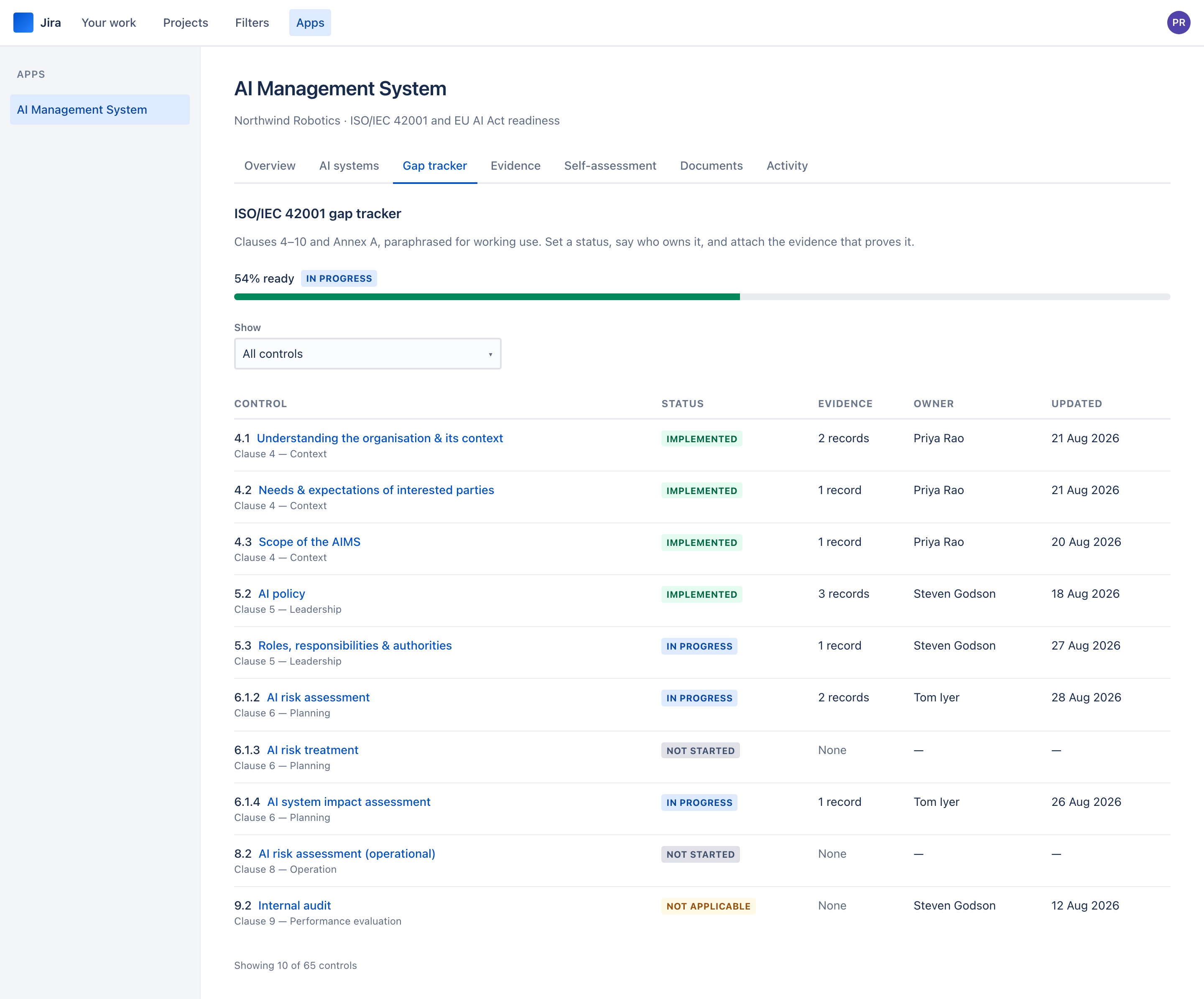
65 controls, and no, you do not do them in an afternoon. This is the part that runs for months — so the guide is about how to work it sustainably rather than how to click the buttons.
What the catalogue holds
27 controls from clauses 4 to 10 — the management-system requirements: context, leadership, planning, support, operation, performance evaluation, improvement. Then 38 from Annex A, the AI-specific controls: policies, internal organisation, resources, impact assessment, life cycle, data, information for interested parties, use of AI systems, and third parties.
Titles are paraphrased for working use. The app deliberately does not reproduce the standard's text — that is licensed content, and reproducing it would put both you and us on the wrong side of the licence. Each control cites its clause number so you can read the standard alongside, which you will need to do anyway to be certified against it.
The four statuses, and what they mean
- Not started. The default, and the honest state for most controls on day one. A control with no stored state reads as not started, so a fresh install shows 0% across the whole catalogue rather than an empty page.
- In progress. Counts as half in the readiness figure. Use it when work is genuinely underway, not as a way of feeling better about not started.
- Implemented. The thing exists, is being done, and you could show somebody. If you cannot attach evidence, it is probably in progress. The app holds you to it: an implemented control with no evidence, with evidence nobody has dated, or with evidence overdue for review carries a label beside its status — Implemented — no evidence, Implemented — evidence never reviewed or Implemented — evidence out of date. The status stays what you set; the label says what it rests on.
- Not applicable. Excluded from the denominator, not scored as zero. This is how a Statement of Applicability works, and it is the status people are most reluctant to use — but a control that genuinely does not apply to you should say so, with a note explaining why.
Put it in the notes. The generated Statement of Applicability prints your note in the justification column, verbatim, and "N/A" with nothing beside it is the first thing an auditor asks about.
A workable order
-
Do a first pass with no evidence
Go through all 65 and set a status from what you already know. Do not attach anything, do not write long notes. Two hours with the right person in the room. You now have a real readiness figure instead of a blank one, and — more useful — a list of what is genuinely not started.
-
Name owners for everything not implemented
An unowned control does not move. This is a fifteen-minute pass and it is the single highest-leverage thing on the page.
-
Attach evidence to what you claim is implemented
Filter to Implemented, evidence not current and work down it. Every implemented control should have at least one evidence record reviewed in the last twelve months. The ones that do not are the ones you will be embarrassed by, and finding them now is the whole point. A control leaves the list as soon as current evidence covers it.
-
Then work the gaps, in clause order
Clauses 4 and 5 first — context, scope, policy, roles. They are quick, they are prerequisites for the rest, and they move the number visibly, which matters when you are asking people for time.
Recording evidence
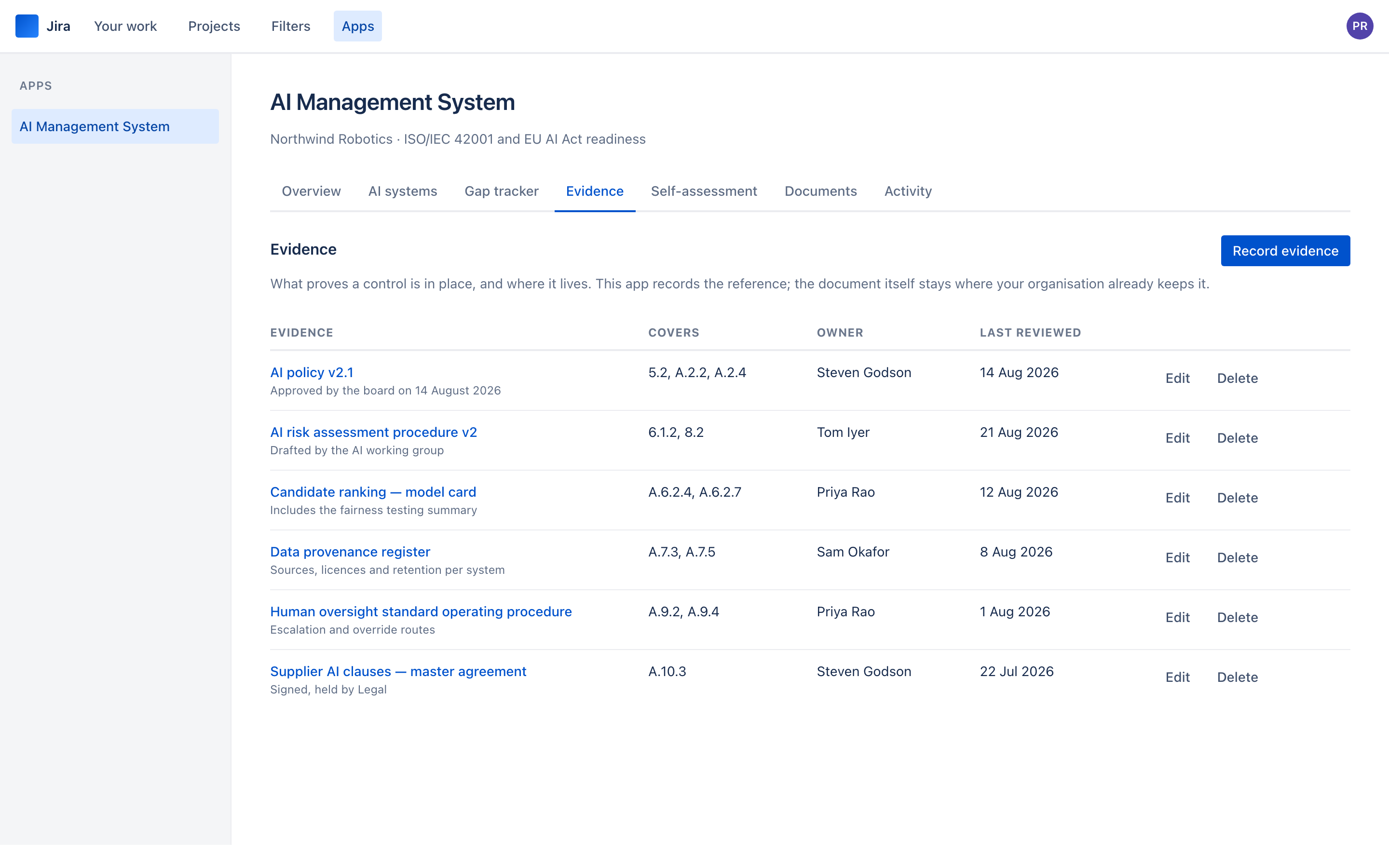
Evidence is a record of what proves a control, not the thing itself. Give it a title somebody would recognise, a link to where it actually lives, an owner, and the date it was last confirmed still true — a new record starts on today’s date, and the date cannot be in the future, because a review that has not happened yet is not one.
One evidence record can cover several controls, and it usually should. An AI policy covers Clause 5.2, Annex A.2.2 and A.2.4 at once — record it once and tick all three. The form groups the controls by clause and Annex A section: open Clause 5 — Leadership and Annex A.2 — Policies to find them, or use Select all when one record covers a whole section.
The review date is the field people ignore and later wish they had not. A policy approved two years ago and never revisited is not evidence of a working management system; it is evidence of one that stopped. The date is how you find those before an auditor does.
Evidence falls due for review twelve months after its last-reviewed date. The evidence list has a Review column — Due in 12 days, Due since a date, or No review date — and a Show filter for Review due and No review date. The overview lists both under "worth your attention", and beside the readiness figure it says how many implemented controls rely on out-of-date or no evidence. Reviewing a record means confirming it is still true and moving its last-reviewed date on.
Link the work that is already in Jira
The work that closes a gap — the corrective action, the change, the policy review — is usually already a Jira issue. Link it to the control rather than describing it twice.
-
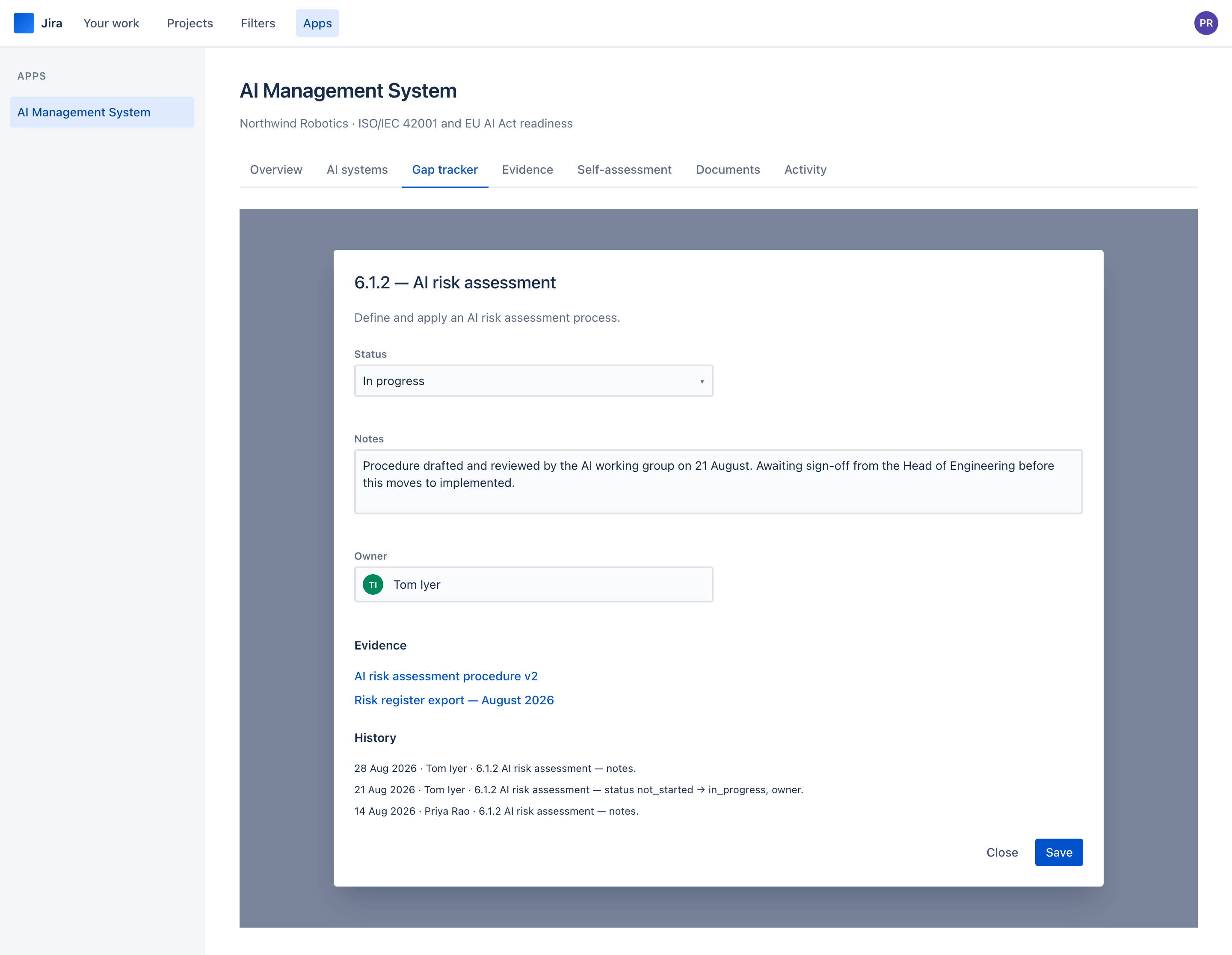
Open the control
From the gap tracker, open the control and find Remediation work.
-
Type the issue key
Enter the key —
SUP-123— under Issue key and choose Link an existing issue. It can be in any project you can see in Jira; a key you cannot see is refused as not found, the same answer Jira gives. Linking needs Contribute. Read only can see the links but cannot add or remove them. -
Unlink with a reason
If an issue was linked by mistake or no longer belongs, choose Unlink and say why. The reason goes on the control's history, next to the line recording that the issue was linked in the first place.
What the app stores is the link, not the issue: the issue's id and key, who linked it, and when. Its status and resolution are read from Jira every time the page is opened, as the person looking — so the status is never out of date, and somebody who cannot see the issue in Jira is told it is not visible to you in Jira and learns nothing else about it. Linking and unlinking never change the issue. The app raises nothing in Jira, and it holds no scope that would let it write there.
The gap tracker's Remediation column reads like 2 linked · 1 open, and the overview gives the total — Remediation: 6 linked · 4 open. When a control's status and its linked work disagree, the control says so:
- This control is marked implemented, and linked work is still open — either the claim is early or the issue is stale.
- All linked work is done, and this control is not implemented — either the control can move, or the work did not close the gap.
Neither flag changes the status. Which one is wrong is a judgement for a person, and the app leaves it with you.
Because an owner who can delete a line can erase the status change made the week before an audit. The trail is the artefact that makes the rest of it credible, so the app has no update and no delete for it — not for contributors, not for administrators, not for us.